Open an account
Opening a Binance account, field by field
The sign-up itself is five minutes. What actually stops people is a verification code that never arrives, an ID photo that keeps getting rejected, and a region prompt nobody explains. All of it is covered here, once.
If you have not started, read straight down and follow along.
If you are already stuck somewhere, jump: where the referral code goes · code never arrives · what identity verification wants · rejected, how to fix it · region prompt.
Before you start: three things within reach#
Not much. Just these three. With them ready, the whole process usually goes through first time.
| What you need | Specifically | Why it matters |
|---|---|---|
| An email you will keep | A personal address, not a work or university one. It should have two-factor authentication on it already | It becomes the primary identifier on the account and the thing account recovery depends on |
| A phone you actually use | Country code matching where you really are, able to receive SMS immediately | Needed for security confirmations and withdrawals later, not just sign-up |
| An unexpired ID document | Passport, national ID or driving licence. All four corners visible, not expired | Verification is mandatory. A blurred, cropped or glare-covered photo gets rejected, and that is avoidable |
One more thing worth settling now: the name you type at registration has to match your document exactly. That includes spelling, whether you have a middle name, and which order given name and family name go in. Getting this wrong means the mismatch only surfaces at the identity check, and fixing it usually needs a support ticket and a lot of waiting.
Step 1: check you are on the real site#
This is not filler. The most developed scam in this industry is a pixel-perfect copy of the official site on a domain that differs by one character, promoted through ads, private messages and “tutorials”. Whatever you type into it — email, password — is relayed live to somebody else.
Three checks; use them together
- Type the address yourself. Do not click a link somebody sent you, including a friend forwarding one.
- Search the official app in your phone’s app store and confirm it is the official one: the developer name should match the exchange itself, and the exchange’s own website should link to that same listing. Downloads and ratings alone prove nothing — copycat apps can look convincing.
- Read the end of the domain, not the start. What matters is the last two segments. In
accounts.binance.comthe actual domain isbinance.com. Things likebinance-cn.xyzorbínance.comare fakes.
A wrong password can be changed. A code that does not arrive can be waited out. But typing your password once into a phishing site hands over the account and everything you later put in it. That loss is essentially never recovered.
Spend the extra thirty seconds checking the domain rather than saving three seconds by clicking a link.
Open the registration page
Below is Binance’s official registration entry point. The link carries this site’s referral code BN0112. You can register perfectly well with or without a referral code, and using one costs you nothing extra — what it does is let this site receive a share of trading fees from the exchange’s side, which is our only source of income. Full detail on the revenue disclosure page.
This is the only registration link on this entire site. We do not register on your behalf, charge any fee, or ever ask you for a password, verification code or seed phrase. Once the page opens, check the address bar shows binance.com. Crypto carries risk — finish reading this page before you decide.
Step 2: choose how to register#
The registration page usually offers several options: email, phone number, and third-party sign-in such as “Continue with Google” or “Continue with Apple”.
| Method | Suits | What to understand |
|---|---|---|
| Email Recommended | Almost everyone | Easiest to handle if you change phone number later. The email itself must have two-factor enabled |
| Phone number | People who prefer a number as their login | Changing number later goes through a security process, usually with a temporary withdrawal hold |
| Google / Apple | People who do not want another password | Your exchange account security becomes your Google or Apple account security. If that account is compromised, so is this one |
| Telegram | — | Not advisable for a beginner opening an account that will hold money |
Our suggestion is register with email, then bind your phone number separately inside the account. That gives you two independent channels, so if one has a problem the other can still verify you.
Choosing a password
- Use it on this one site only — never reused from email, social media or shopping accounts;
- Length beats complexity. Four unrelated words strung together (for example
walnut-harbour-drift-lantern) is stronger thanP@ssw0rd!; - If you cannot remember it, use a password manager, or write it on paper and put it in a drawer — paper is more reliable than your memory and safer than a note on your phone.
Step 3: where the referral code goes#
This field is easy to miss, because it is usually collapsed behind a small link rather than shown as a normal input.
-
Look for a collapsed row on the registration form
It is typically labelled something like “Referral ID (optional)” or “Have a referral code?”. You have to click it before the input appears.
-
It may already be filled in
If you arrived through the link above, the field is usually pre-populated. Check it rather than assuming — some browser settings strip it.
-
Confirm or type it manually
This site’s code is
BN0112. If you type it by hand, watch the difference between the digit 0 and the letter O.
A referral code can only be entered at the moment of registration. Once the account exists it cannot be added. That is the exchange’s rule, not the platform being awkward.
If you miss it, nothing bad happens to you — your account works identically and your fees are the same. It simply means this site earns nothing from it. That is genuinely fine; see using the site without it earning.
Step 4: when the verification code never arrives#
If you stall here, the instinctive reaction makes it worse.
Repeatedly requesting a new code triggers rate limiting, which delays delivery further, which makes you press it again. It is a genuine loop.
Send one. Wait a full two minutes without touching anything. Only then work through the list below.
If it is an email code
- Check spam and junk. This is the answer more often than anything else.
- Check any “Promotions” or “Updates” tab if your provider sorts mail into categories.
- Search your whole mailbox for the exchange name rather than scrolling the inbox — filters may have moved it.
- Confirm you typed the address correctly. A typo means the code went to somebody else entirely.
If it is an SMS code
- Check the country code is right. The dropdown can sit on a default prefix that is not yours; if it does, the code is sent to a number that does not exist or belongs to someone else, and never reaches you.
- Turn flight mode on and off, or restart the phone. This forces the handset to re-register with the network, which can release messages queued while it was out of contact.
- Check whether your carrier or phone has an SMS spam filter that has quietly quarantined it.
- If you are roaming or using a virtual number, delivery is unreliable — see below.
They can work at sign-up and then fail later, at exactly the point you need a security confirmation to withdraw. By then the account has money in it and you cannot receive the code.
If you are planning to change your number anyway, change it before you register rather than after — changing a bound number afterwards triggers a security process with a withdrawal hold.
If you get a region prompt#
Partway through, you may see something like “based on our assessment, your region is …”. This is not an error and you have not done anything wrong.
Large exchanges route users to different legal entities depending on jurisdiction, because the rules they operate under differ by country. The available services, payment methods and limits can differ between those entities.
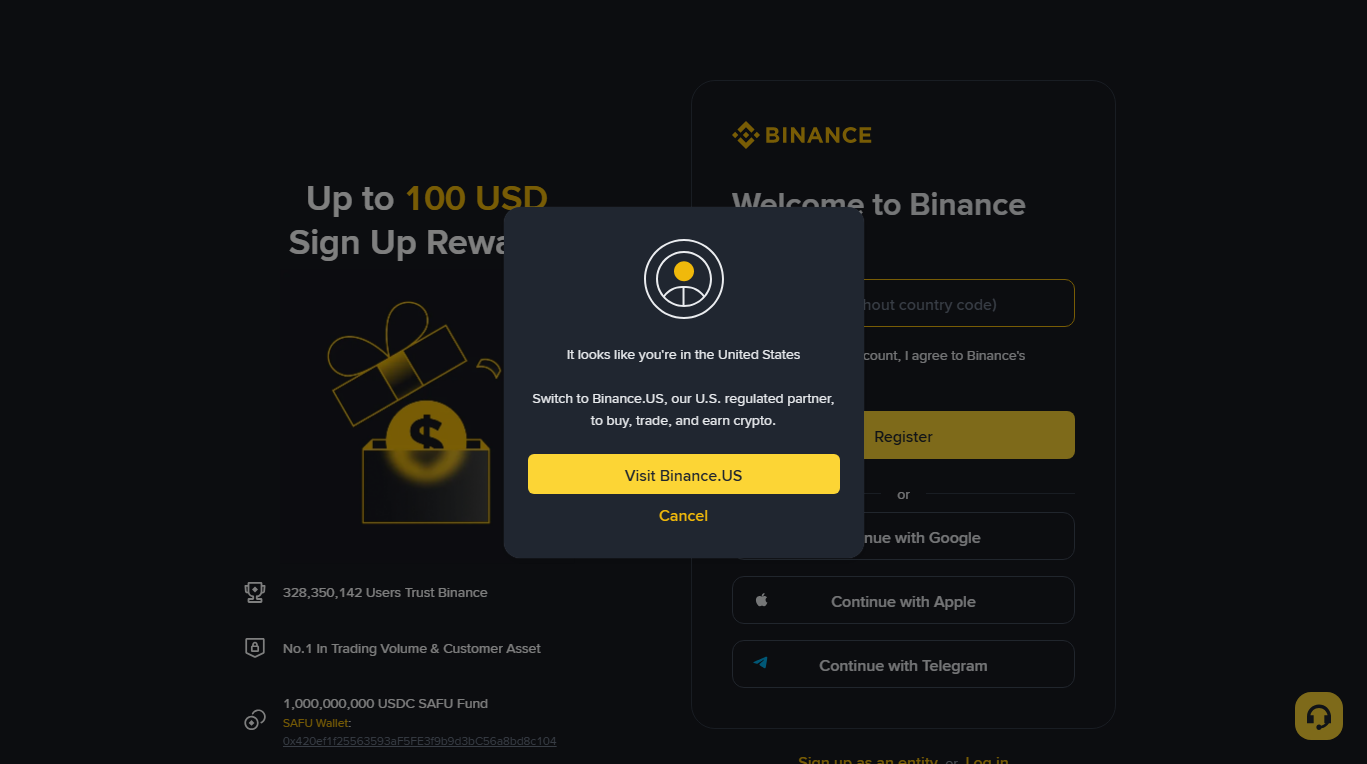
Where Binance.com itself is not an option (checked 6 October 2026): Singapore — fiat deposits, fiat purchases and spot trading were switched off for Singapore users on 26 October 2021 by official notice, and the local entity Binance.sg has since closed; Canada — Binance announced its exit in May 2023; United Kingdom — no new UK sign-ups since October 2023; United States — you are routed to Binance.US, a separate platform. In those places you need a platform registered where you live, and the screens on this site will not match.
What to do: go with the region you are actually in. Choosing somewhere you do not live creates a mismatch that surfaces at identity verification, when your document does not match the declared region — and unpicking that is far more painful than accepting the prompt now.
Step 5: do not fund it yet#
The account now exists and the interface will start encouraging you to deposit. Do the security setup first.
The reasoning is simple: the cheapest possible moment to get security wrong is while the balance is zero. Most guides put security at the end, by which time there is money to lose.
-
Turn on two-factor authentication
Use an authenticator app rather than SMS where you can. SMS can be intercepted through SIM-swap attacks; an authenticator app cannot. Save the backup codes it gives you somewhere offline.
-
Set an anti-phishing code
You choose a short phrase, and from then on the exchange shows it in the emails it sends you. An email that claims to come from the exchange but does not show your code should be treated as fake. The reverse is not a guarantee: the code does nothing for text messages, calls or chat messages, and it stops helping if you ever share it. This is one of the highest-value two-minute settings available to you.
-
Look at withdrawal address whitelisting
It restricts withdrawals to addresses you approved in advance. Less urgent on day one, but worth knowing it exists before you hold anything meaningful.
The full reasoning for this ordering is in the walkthrough.
Step 6: identity verification#
Every regulated exchange requires this. It is a legal obligation they operate under, not a preference, and there is no version of this that skips it.
What it normally involves:
- Personal details — name, date of birth, address. These must match your document.
- A photo of the document — usually front and back.
- A liveness check — a short selfie video where you turn your head or blink, confirming a real person is present rather than a photograph.
Getting the photo right first time
| Do | Do not |
|---|---|
| Flat surface, even indirect daylight | Direct lamp or flash — it creates glare that obscures text |
| All four corners inside the frame | Fingers covering any edge or corner |
| Fill most of the frame, in focus | Taken at a distance, or at a sharp angle |
| The original document | A photocopy, a scan, or a photo of a screen |
Step 7: if verification is rejected#
Work from the wording of the error you actually got rather than guessing.
| What it says | What it usually means | Fix |
|---|---|---|
| Document unclear / unreadable | Glare, blur or a cropped corner | Retake on a flat surface in daylight, no flash, all four corners in frame |
| Information does not match | Typed name, date of birth or spelling differs from the document | Correct the typed details to match the document character for character, including middle names |
| Document expired / not accepted | Out of date, or that type is not accepted for your region | Use a different document type — a passport is accepted most widely |
| Liveness check failed | Poor lighting, face partly covered, or moving too fast | Even front lighting, remove glasses, hat and mask, follow the prompts slowly |
| Under review for a long time | Queued for manual review | Wait. Resubmitting repeatedly puts you at the back of the queue again |
Services offering to “get you verified” using somebody else’s identity exist. Using one means the account is legally not yours — which surfaces precisely when you try to withdraw a meaningful amount, and at that point you have no standing to recover anything.
Step 8: confirm it really worked#
Before moving on, check all five:
- You can sign out and sign back in with your own password;
- Two-factor authentication is on, and you have stored the backup codes;
- The anti-phishing code is set, and you know what it is;
- Identity verification shows as approved, not pending;
- Your phone number is bound and can receive a code right now.
With those done, the account is ready. Funding it is the next subject — covered in the walkthrough.
Verified but still limited?#
This surprises people. Passing identity verification does not necessarily remove every restriction, because separate limits exist for different reasons:
- New-account cooling periods. Withdrawals are often restricted for a period after registration, or after a security setting changes. This is a fixed anti-fraud measure and simply expires.
- Payment-method limits. Card and bank transfer routes have their own caps that have nothing to do with verification level.
- Regional caps. What is available differs by jurisdiction.
- Higher verification tiers. Larger amounts may require an additional level, typically proof of address.
None of these mean anything is wrong with your account.
Common questions#
Can I register without providing identity documents?
Not on a regulated exchange. Routes that avoid it exist but they trade away exactly the protections you want when you are new: no recourse, no support, and no way to recover anything if something goes wrong. For a first purchase it is the wrong trade.
Is it safe to give an exchange my ID?
It is a normal requirement that banks and brokers have too. The real risk is not the legitimate exchange — it is sending documents to a fake site. This is why step 1 matters more than everything after it.
Can I open a second account?
Generally one person may hold one account. Multiple accounts on the same identity usually end up frozen for review.
I missed the referral code field. Can I add it now?
No — it can only be applied at sign-up. It makes no difference to your account or your fees. See the disclosure page.
Should I use the app or the website?
Either works and the accounts are the same. The app is generally easier for the identity check because the camera flow is smoother. If you install it, get it from your phone’s official app store rather than a link.
Last updated: 7 October 2026. Interfaces change frequently — where this page and your screen disagree, trust your screen, and please tell us. This page describes how to operate and is not investment advice.
Related
- The full walkthrough Where this fits in the whole process
- Revenue disclosure What the referral code actually does
- About and editorial policy How this site decides what to publish