Crypto deposit
Moving USDT onto an exchange from another platform: which network to pick, where the address comes from, and what to check if it never arrives
When your coins sit on another exchange or in a wallet app, one transfer gets done from both ends. You copy a deposit address on the exchange that will receive the coins, then go to the platform that holds them and withdraw (or “send”) to that address. Both ends must use the same network; Binance warns that a mismatch can lose the funds for good. Once the deposit lands, it shows up under Transaction History.
Step: Payment methods and fees
On this page (6 sections)
Suppose you hold some USDT on another exchange, or in a self-custody wallet app, and want it on Binance so you can buy bitcoin with it. Binance’s help centre calls this a crypto deposit. The platform you are moving it from will call the same transfer a withdrawal, or in many wallet apps simply Send. One movement of coins, described from opposite ends. The order below follows that movement: the receiving side first, then the sending side, then how to track it and what to do when it stalls. Button labels are taken from Binance’s English help centre; where the app and the website use different words, you get both.
Not holding any crypto yet? Skip this page and buy directly by card, bank transfer or P2P instead; getting money in compares those routes.
Where to find your USDT deposit address on Binance#
The address belongs to the receiving account, so this part happens on Binance, not on the platform that currently holds your coins.
- App: log in, tap
Deposit, thenDeposit Crypto. Website: clickDeposit, thenDeposit Cryptoon the side panel. - Pick the coin. You are sending USDT, so choose USDT. A BTC address will not accept it, because each coin has its own addresses.
- Pick the network. Everything hinges on this field, so the next section is devoted to it.
- A QR code and an address for that particular network appear. Tap or click the copy icon beside the address. The app also offers
Save and Share Address, which saves the QR code so you can import it on the sending platform. - Decide where the coins land. In the app, tap
More Detailsand switch between Spot Wallet and Funding Wallet. On the website the same choice sits next toSelected wallet. If the plan is to buy bitcoin straight away, Spot saves you a transfer later.
Change the network and the address changes with it. Set the network before you copy, never the other way round.
TRC20, ERC20 or BEP20: which network should a USDT deposit use?#
USDT exists on several blockchains at once. Whatever network you choose on Binance has to be exactly the one the sending platform uses for the withdrawal. Binance puts it bluntly: pick incompatible networks and you lose the funds. Its guide also says, in capitals, not to choose the cheapest fee option; check which networks the sending platform offers and choose from the ones both sides support.
The catch is that platforms label the same chain differently. Binance’s deposit guide lists how its own short names map to chains. The table follows that list, with a third column for the names you are likely to meet elsewhere:
| Name on Binance’s deposit page | Chain it refers to | Also shown elsewhere as |
|---|---|---|
| TRX | TRON network (TRC20) | Tron, TRC20 |
| ETH | Ethereum network (ERC20) | Ethereum, ERC20 |
| BSC | BNB Smart Chain (BEP20) | BNB Smart Chain, BEP20 |
One pair deserves a slower look. ERC20 and BEP20 addresses both begin with 0x and have the same length, so the sending platform’s address-format check will happily accept an Ethereum address on BNB Smart Chain, or the reverse. A TRC20 address starts with T and looks nothing like them. An address that pastes in without an error message tells you nothing about whether the network is right; read the network name on both screens, letter by letter.
What if none of the networks the sender offers appears in Binance’s list for USDT? Then the two platforms share no route, and this transfer cannot be made as things stand. Picking something that merely looks close is how coins go missing.
When do you need a memo or tag for a crypto deposit?#
For some coins, Binance’s deposit page shows a second field under the address, labelled Memo; other platforms may call it Tag or Destination Tag. Binance describes it as a unique identifier used to work out which account a deposit belongs to. Its help centre names BNB, XEM, XLM, XRP, KAVA, ATOM, BAND and EOS among the coins that need one, and says networks such as BEP2 and EOS require it.
The rule fits in one line: if Binance’s deposit page shows a memo, enter it exactly on the sending side; if it shows none, leave that box empty. A missing or wrong memo does not fix itself. The deposit has to be claimed through a separate recovery request.
On the sending platform: paste the address, match the network, enter the amount#
Now switch to wherever the USDT is held and open its Withdraw or Send screen. Layouts vary, but you are filling in the same few things:
- Address. Paste what you copied. Then compare the first and last four or five characters with the address on Binance’s deposit page.
- Network. The same one you picked on Binance. Once the network and amount are filled in, the sending platform shows the fee for this withdrawal; Binance’s guide points you there for the cost. Fees can differ a lot from one network to another, but a cheaper network is only an option if Binance accepts it too.
- Memo. Fill it in only if Binance showed one.
- Amount. Before sending, look up the minimum deposit amount on Binance’s deposit page. Binance states that anything below it will not be credited, and that includes a small test transfer.
Your deposit address only ever comes from your own account’s deposit page. A “Binance deposit address” sent to you in a chat, or a request to send coins to someone who will top up your account, means the coins go to an account that is not yours. Binance’s recovery guide lists deposits made to another user’s account among the cases it cannot help with.
How long a deposit takes, and where to check its status#
After the sending platform submits the withdrawal, the transfer waits for blockchain confirmations. Binance gives no fixed time: its guide says confirmation time varies with the blockchain and its current network traffic. Bitcoin is the example it spells out. One network confirmation is the minimum for a BTC transaction, yet Binance waits for at least two before unlocking the deposit.
To follow progress:
- Website:
Wallet, thenTransaction History. - App:
Wallets, thenSpot, then the transaction history icon on the right.
When the deposit completes, the coins sit in whichever wallet you selected on the deposit page. Choose Funding and then look in Spot, and it will seem as if nothing came; Funding account vs spot account explains how to move them across. Binance also notes that while a deposit is still unconfirmed, withdrawals and transfers between your Binance wallets may be affected until it clears.
USDT deposit not showing up? Check the sending side first#
Before contacting Binance support, open the withdrawal history on the sending platform. Find this transfer’s status and its transaction ID, also written TxID or transaction hash. That status splits the problem in two.
The sender shows the transfer as failed, unconfirmed or still processing. The coins have not left, or the transaction did not succeed on-chain. Binance seeing nothing is expected here, and its recovery guide says plainly that it cannot help with transactions marked unconfirmed or failed. The sending platform’s support is the right contact.
The sender shows it completed, and the blockchain shows it confirmed. The coins have reached a Binance address, so the cause lies on the receiving side. Binance’s help article “Why Hasn’t My Deposit Been Credited?” lists five reasons; work down them in order:
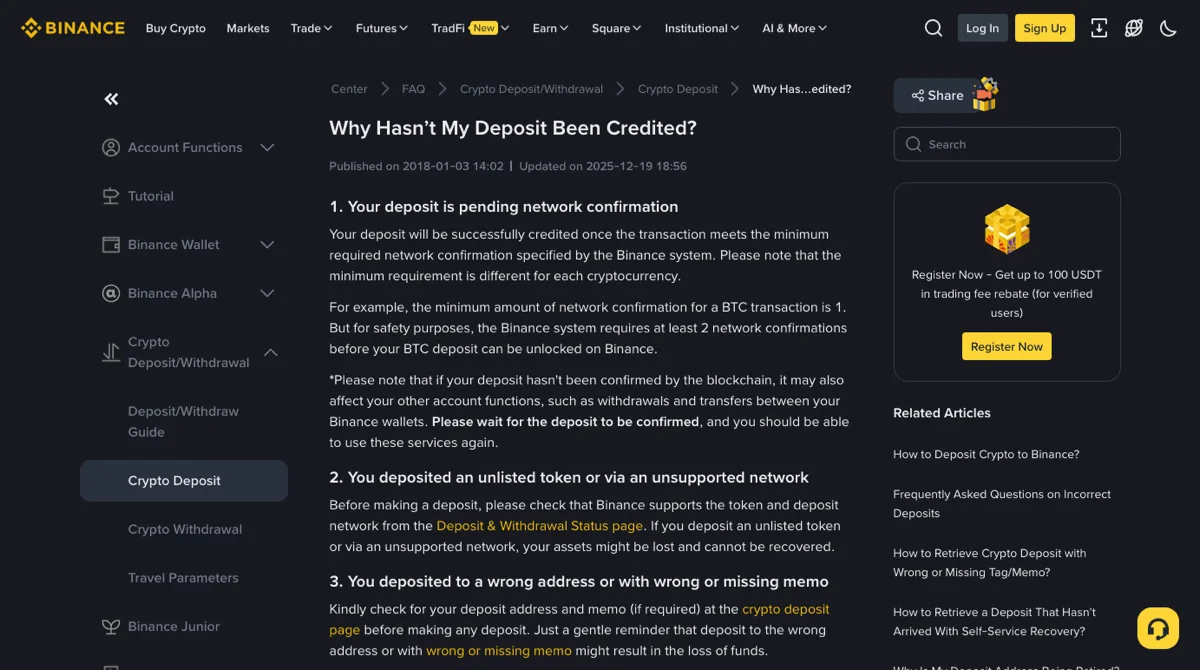
- Still waiting for confirmations. Until the coin reaches Binance’s required number, Transaction History shows the deposit as pending. Waiting is the fix.
- Unlisted token or unsupported network. Binance says such deposits may be lost and unrecoverable. For some unlisted tokens, the deposit history shows the status Wrong Deposit; clicking the entry offers
Retrieve now. - Wrong address, or a wrong or missing memo. Memo mistakes have their own recovery form.
- Below the minimum deposit amount. The coins will not be credited.
- Wallet maintenance. Deposits are suspended while the wallet is under maintenance; Binance’s help centre has a separate article on what to do during a suspension.
If the transaction is confirmed on-chain and the funds have still not arrived an hour later, Binance’s next step is a self-service recovery application, which asks for the TxID mentioned above. Only deposits into your own Binance account qualify, and nobody can apply on your behalf.
Related
- Funding account vs spot account Which wallet the deposit landed in, and how to transfer
- How to read a spot trading page Placing a BTC/USDT order once the USDT is in
- Bought bitcoin but cannot find it? Other reasons a balance can look wrong
- Getting money in: every method compared Where to start if you hold no crypto yet
- Glossary Network, address, stablecoin and similar terms
Last updated: 26 November 2026. Binance help centre pages opened and read in November 2026: How to Deposit Crypto to Binance?, Why Hasn’t My Deposit Been Credited? (marked as updated 2025-12-19) and How to Retrieve a Deposit That Hasn’t Arrived With Self-Service Recovery? (2026-05-29). Available networks and minimum amounts differ by coin, and every sending platform lays out its withdrawal screen in its own way.