Open orders
Limit order not filled? How to check, edit or cancel it
Start in Open Orders on the spot trading page: that row carries the order’s status and how much of it has filled so far. A live buy order keeps funds reserved for its unfilled quantity. If you cancel it successfully, those funds become available again; check the final status because part of the order may fill before cancellation completes. Then decide whether to wait, change the price, or take the order back — but do not place a second one just because your available balance looks smaller.
Find the order before you touch anything#
Everything below concerns an ordinary spot limit order. Futures, Convert and a stop-limit order whose trigger has not fired yet all behave differently and sit in different places. While a buy order waits unfilled, the coin you asked for will not show up on your assets page, and the money committed to the order cannot be spent on a second trade. If part of it has filled, you now have two separate things to look at: the amount already bought, and the remainder still queued.
The order lives in the panel underneath the price chart. On the website, Open Orders lists everything still live, and each row carries its own cancel control. In the app the route is Trade, then Spot, then the same Open Orders section, where you can cancel a single order or use Cancel All.
Open Orders, Order History and Trade History hold three different things, and mixing them up is how people talk themselves into believing an order vanished. Checking your trade history and fees pulls the three apart. This guide stays with orders still sitting in the first tab.
The price reached your limit and nothing happened#
Binance publishes a help article under exactly that complaint — “Why Wasn’t My Limit Order Filled?” — and it sets out three conditions a limit order has to meet before it executes: the market price has reached your limit price or a better one, enough liquidity exists to fill the order, and enough time passes for it to execute.
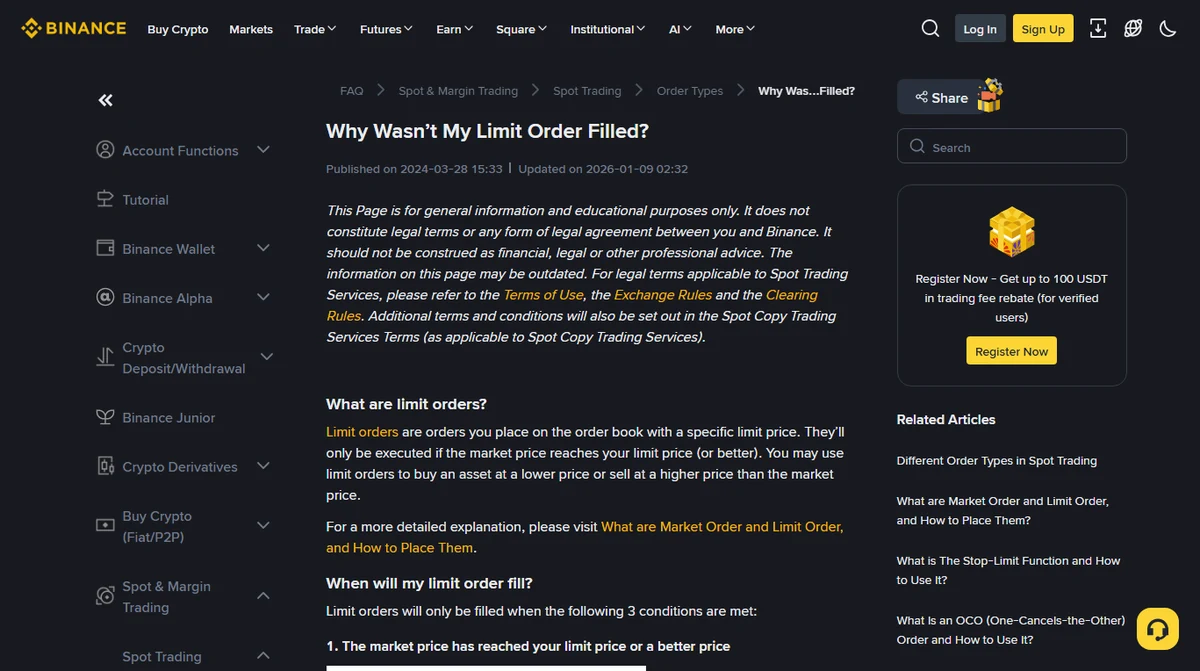
Check the direction first. A buy order needs somebody offering to sell at or below your limit; a sell order needs a bid at or above it. The last traded price flashing on screen tells you what one trade went through at a moment ago, and nobody is obliged to still be standing there.
Then the quantity available inside your limit. Bitcoin makes no exception to this: the book moves, and whether you get filled in full depends on what was actually on offer at the time and how much you asked for. When the supply at your price runs out, the order fills partway and waits for the rest.
Timing is the condition people argue with. The help page is explicit that in a fast market the price can touch your number without your order reaching the book and executing in time. If you are comparing against a chart, line up the chart’s timezone with your order’s timestamp before concluding anything. A candle that grazed your price proves the market traded there — not that your order was in the queue when it did.
Where the money sits while the order waits#
Placing a spot buy order reserves the funds behind it, so your available balance drops by that amount. Nothing has left the account: the quantity you hold of that currency is unchanged, although the estimated value on the assets page still moves with the market. Whatever fills gets settled, and the rest stays reserved against the part still queued.
To put the unfilled money back into circulation, cancel the order, confirm the result in Order History, then look at the available balance of the currency you were paying with. One caveat: an order can match in the instant you press cancel, so take the final filled quantity as the record of what happened. If the status looks stale, refresh and read it again rather than placing something new on top.
Sell orders mirror all of that, with the reservation on the other side. An open sell order holds the coin you offered, not cash, and it comes back to the available column once the order is cancelled. A total balance will never tell you which slice of it is currently committed to an order.
A GTC order stays on the book until it fills completely or you cancel it. Anyone used to day orders in equities should note that it will not quietly expire at the close.
Limit orders can carry other instructions: IOC cancels whatever cannot be filled straight away, FOK insists on the whole quantity immediately or nothing at all. Check which one your order actually used — and bear in mind that a GTC order parked there for weeks still only fills on price, liquidity and the order remaining valid. Binance covers these settings on its page about maker, time in force and iceberg orders.
Wait, move the price, or take it back#
No rule here fits everybody. One question you can answer for yourself, though: why did you type that particular price?
Suppose you set it well under the market deliberately, because you only wanted to buy if the price came down that far. Then waiting is no malfunction — waiting is the entire job of the order, and the order is doing it. The thing worth revisiting is whether that money has somewhere better to be in the meantime. If so, take the order back and place a fresh one when you actually want to buy.
If instead you expected a limit order to buy immediately at the number you typed, stop and check which order type you used. A limit buy caps what you will pay and promises nothing about when, or whether, it executes. A market order runs the other way: it matches as fast as it can, and in exchange you cannot pin down the average price you end up with. Market or limit, which to use first covers that trade-off. Chasing the price upward to end the wait is a decision worth making on purpose rather than out of impatience.
The third case is an order the market has long since walked away from. Nobody can tell you when or whether it comes back. An ordinary spot order resting unfilled does not accrue a trading fee while it waits — what it does cost you is the use of the funds. If you would no longer buy on those terms, the order no longer represents what you want.
Binance lets you edit an open spot limit order directly: on the website, the Edit icon next to the order in the Open Orders tab under the candlestick chart; in the app, the equivalent control on the order. Enter the new price or amount and confirm. The detail that matters is in the official instructions for modifying an open limit order: editing cancels the previous order ID and creates a new one. You are replacing the order rather than nudging it, so whatever queue position it had is gone. The same page warns that an insufficient balance leaves the order cancelled instead of edited. Where no edit control appears, confirm the original cancelled successfully before placing the replacement; anything already filled stays filled.
Half of it bought, half still queued#
The order row shows the filled quantity alongside the total you asked for. The filled part is a completed purchase: you own it, you cannot undo it, and nothing you do to the remainder touches it. The unfilled part is still in the queue, and cancelling releases the funds reserved for that portion only.
Fees follow the executed quantity, so a partial fill is charged on what actually traded rather than on the size you originally typed. What buying bitcoin costs explains how the charge is built, and why the quantity landing in your account comes out slightly under the number on the order.
A fourth possibility: the order never got placed#
If the order appears in neither Open Orders nor the history tabs, check the dull things before assuming a rejection: the right account, the right spot pair, a date range that covers it, any filter left over from last time, then refresh. An empty list by itself proves nothing. Look instead for the message shown when you submitted, or for the order ID. Two checks commonly stop an order at submission:
-
A price too far from the market
Platforms cap how far a limit price may sit above or below the current market price, and an order outside that band gets refused outright. The permitted range differs by pair and by product, so the figure that counts is the one on your own order screen.
-
An order value under the pair’s minimum
Every trading pair has a minimum order value, and anything below it will not submit at all. The minimum amount you can buy bitcoin with works through what that comes to in practice.
When the page tells you the price or the amount breaks a rule, fix that specific thing and submit again. When the page simply hung or the connection dropped, find out whether the order exists before retyping it — a duplicate order is a worse outcome than a slow page. If the status stays unclear, note the pair, the time you submitted and the exact error text, and take those to the platform’s own support channel.
Related
- Market or limit order, which first Decide before the next one goes in
- I bought the wrong amount Filled and unfilled part ways here
- Trade history and fees What each of the three tabs holds
- Bought bitcoin but cannot find it? For when the order did fill
- Order type decision tool Pick a type for your situation
Last updated: 2 October 2026. The help page in the screenshot above, the page on modifying an open limit order, and the page covering time in force were all opened and read on 2 October 2026. Written around Binance spot trading — menu positions change between versions, and other exchanges name their order tabs and set their price bands differently. This guide explains how orders behave, not when to buy or sell.