Spot vs margin
Can bitcoin bought on spot be liquidated? No — but make sure it really was a spot order
Bitcoin you paid for in full on the spot market carries no loan, so it has no liquidation price. However far the price falls, the exchange will not sell it on your behalf. Liquidation happens to borrowed margin positions and to futures positions. So the useful question is not “will it get liquidated?” but “was the order I placed actually on the Spot tab?”
On this page (5 sections)
Why a spot purchase cannot be force-closed#
Liquidation only makes sense when there is money to recover. Either you borrowed from the platform, or you put down a slice of margin to control a bigger position. If the price moves far enough against you, the platform sells your collateral to get its money back before the loss eats into it.
A spot purchase skips that layer entirely. Say you spend 100 USDT on bitcoin. The 100 USDT was yours, the bitcoin it bought is yours, and nothing is owed. If the price halves, the estimated value on your assets page drops to roughly half — but the quantity of bitcoin stays exactly where it was, and nobody comes to collect it.
None of that means you cannot lose money. With spot, the risk is the price itself. A falling valuation is a real loss in value; sell near the bottom and the loss is locked in, and holding on is no guarantee the price comes back. What spot rules out is owing more than you put in: the most you can lose is what you paid for the coins.
What does get liquidated: margin and futures#
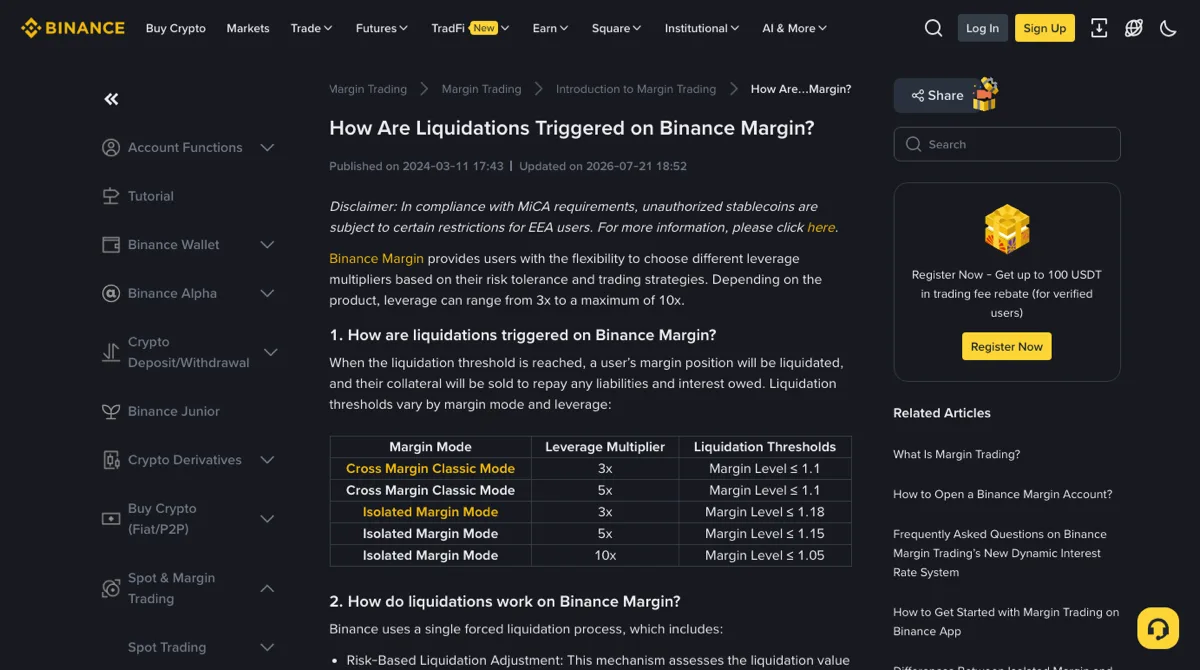
Margin trading means trading on the spot market with borrowed funds. Binance’s help page on how liquidations are triggered on Binance Margin puts it plainly: when the liquidation threshold is reached, a user’s margin position will be liquidated, and their collateral will be sold to repay any liabilities and interest owed. The same page gives leverage from 3x up to a maximum of 10x, with thresholds that depend on mode and multiplier — Cross Margin Classic Mode at a margin level of 1.1 or below, for instance, and 10x Isolated Margin at 1.05 or below. These figures are as the page stood when we checked it in November 2026; Binance can change leverage limits and thresholds, so read the current version before relying on any of them.
Margin comes in two modes, cross and isolated. Binance’s explainer on isolated versus cross margin describes cross margin as pooling the assets in the account so they back each other, while isolated margin keeps each pair’s position separate, so trouble stays inside that one isolated account. For a first purchase you only need the short version: both words mean borrowed money.
Futures are a separate product altogether. You are trading a contract on the price, not the coin itself. Binance’s futures liquidation page says liquidation is triggered when a position’s mark price reaches its liquidation price. A futures screen shows leverage multipliers, Long and Short buttons and margin figures; the spot screen shows none of those.
Neither one switches itself on because you tapped the wrong button once. According to Binance’s page on the margin account opening risk review, the margin account is opened when you first transfer funds into it, and you may be asked to complete a risk assessment along the way. If you have never moved money into a margin account and never opened a position on the futures screen, the coins you hold can only be spot.
How to confirm your order was spot: three places#
- The tabs above the order form. On Binance’s web trading page, a row of tabs sits above the buy box. It normally rests on
Spot;CrossandIsolatedin the same row are the margin modes described above. If the tab is not on Spot when you are about to buy, switch back first. Reading the spot trading page has a screenshot of where each block sits. - Which order list the trade landed in. Find the order in your history. It should appear among spot orders, not in a margin or futures record. What each of the three order tabs holds is covered in checking your trade history and fees.
- Which account holds the coins. On the assets page, the bitcoin should sit under Spot or Funding, with no figure labelled as a liability or a borrowed amount next to it. Every column on that page is explained in how to read your crypto asset page.
If all three line up, what you hold is spot. There is one signal from the other direction too. The margin liquidation page mentions that the platform sends margin call notifications as a position nears its threshold. An account that has only ever bought spot has no reason to receive one. If you do get such a message, either you have a margin or futures position after all, or the message did not come from Binance — check inside the official app yourself, and do not tap the link in the message.
Hold off on placing anything new. Go to the margin account or the futures screen and look for open positions and unpaid loans. If there are any, close the positions and repay following the help centre’s instructions, then transfer what is left back to Spot. Do it in that order: moving the assets out first can push the remaining position closer to its liquidation threshold.
My balance dropped — was I liquidated?#
Often the worry starts with a number that got smaller. In a spot account, these are the usual suspects.
The value fell, the quantity did not. Total estimated value is your holdings priced at the current market rate, so it shrinks whenever the price does. Open the bitcoin row and look at the quantity. Same number as before? Then only the price moved.
Available balance is short. A limit order that has not filled keeps its funds reserved, and reserved money does not count as available. Cancel the order and it comes back — see limit order not filled.
The coins are not in Spot at all. Coins bought with a card or through the one-click buy flow often land in the Funding account first. Funding account vs spot account shows how to check and transfer; for other reasons coins seem to vanish, try bought bitcoin but cannot find it.
Slightly less than you ordered. The trading fee came out of the coins you received. That is why a 1 BTC fill can show as 0.999 — worked through in what buying bitcoin costs.
Common questions#
If spot bitcoin falls almost to zero, could I end up owing the exchange?
No. A spot purchase is paid in full with no borrowing, so however far it falls, the loss is limited to what you spent buying it. Only a margin position, which involves a loan, can leave you with a debt.
Does bitcoin bought with a card or one-click buy count as spot?
It was paid for in full, with no leverage and no liquidation price. Those coins often arrive in the Funding account rather than Spot, but like spot holdings they cannot be liquidated — they are just stored in a different place.
So if spot cannot be liquidated, is it safe?
Those are different questions. No liquidation only means nobody will sell your coins for you; a price drop is still a real loss. Risks like a hijacked account or a phishing link have nothing to do with spot versus margin either — see common first-purchase mistakes.
Related
- Reading the spot trading page Where the Spot, Cross and Isolated tabs sit
- How to read your asset page Lower value and fewer coins are not the same thing
- Common first-purchase mistakes Mistaking futures for buying comes first
- Market or limit order: which first Pick the order type once you are on Spot
- Glossary Liquidation, margin, leverage and the rest
Last updated: 14 November 2026. Based on four Binance help centre pages linked above — margin liquidation, isolated versus cross margin, futures liquidation, and the margin account risk review — checked in November 2026. Tab names and menu positions can change between versions, and other exchanges may use different terms. This page explains the difference between spot, margin and futures; it does not tell you what to buy or sell.